
.png)

.svg)
.svg)
.svg)
.svg)
.svg)
.svg)

.png)
-1.png?width=50&name=Vector%20(1)-1.png)
If any of this sounds familiar, you're not alone.
Internal events run on a patchwork of emails, Slack messages, spreadsheets, and phone calls. Here's what that actually costs your team every time.

No single place to start
Submitting an event request means figuring out who handles what, then reaching out across different channels. What should be one request quickly becomes multiple conversations to track.

Approvals routed by hand
Requests move from manager to room owner to the next approver through email and Slack. One slow response can hold up everything downstream, and the host has no way to check without asking your team.

Vendors coordinated separately
Catering, AV, and other service teams work through their own processes. Confirmations live in different places, leaving organizers to piece together what’s ready and what still needs attention.

One change, start over
Move the date, change the room, or update the headcount and the follow-ups begin again. Confirmed bookings drop back to tentative, approvals re-fire, and every service team has to be told by hand.
One request. The whole event, orchestrated.
One request connects rooms, catering, AV, security, and every approval your event needs. Every team is notified, approvals route automatically, and nothing falls through the gaps.
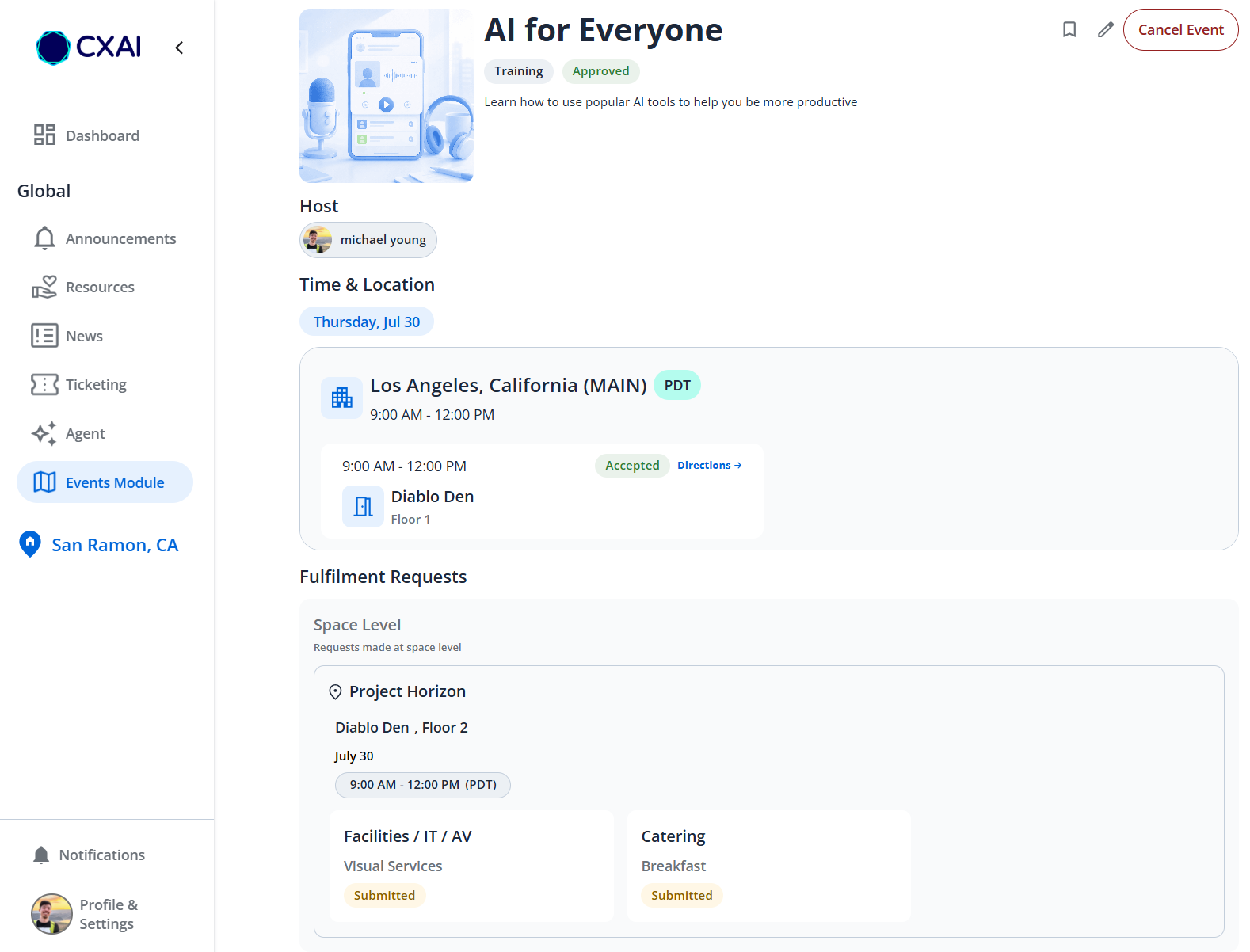
One form. Every service captured.
The event host fills out a single form: date, location, headcount, and every service required. One submission, visible to every team involved from the start.
- Rooms, catering, AV, security, and other services in one intake
- No repeat conversations. Every team sees the same request
- Works with Microsoft 365, ServiceNow, and your existing systems
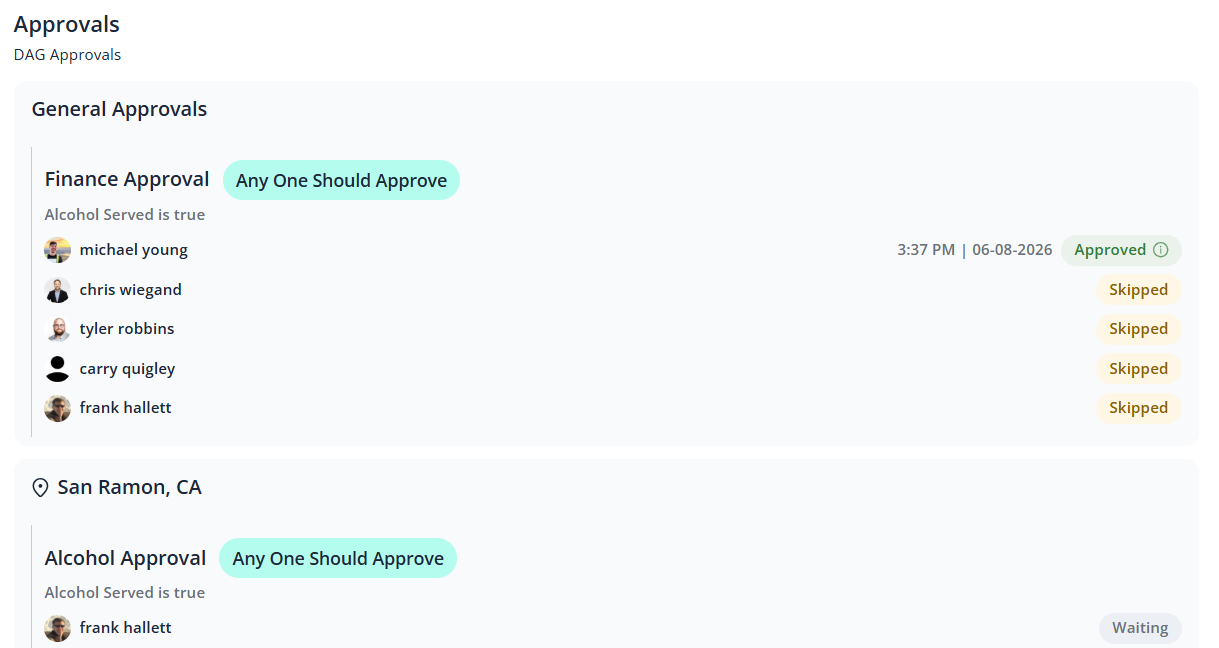
The right people get notified. You don't chase anyone.
When a request comes in, CXAI Events works out who needs to approve it and sends them a notification. If they haven't responded, they get a follow-up automatically. The host sees where every approval stands without having to ask.
- Approvers are notified directly, no email forwarding needed
- Minor changes to an event save without restarting the approval process
- Every decision is recorded automatically as the process moves forward
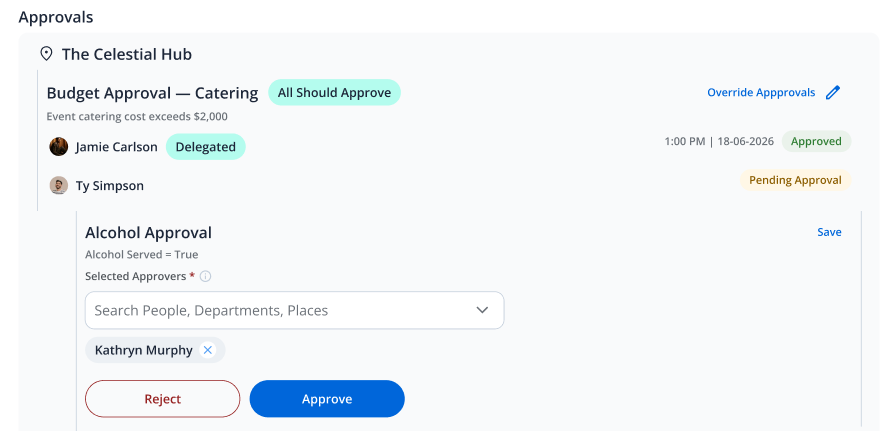
One view of everything in motion.
The event host has one place to see what's confirmed, what's pending, and what still needs attention. No inbox checking, no status pings to your team, no guessing.
- Room, catering, AV, and security status visible in real time
- The host is notified automatically when anything changes
- A single view that replaces the need to contact individual teams for updates
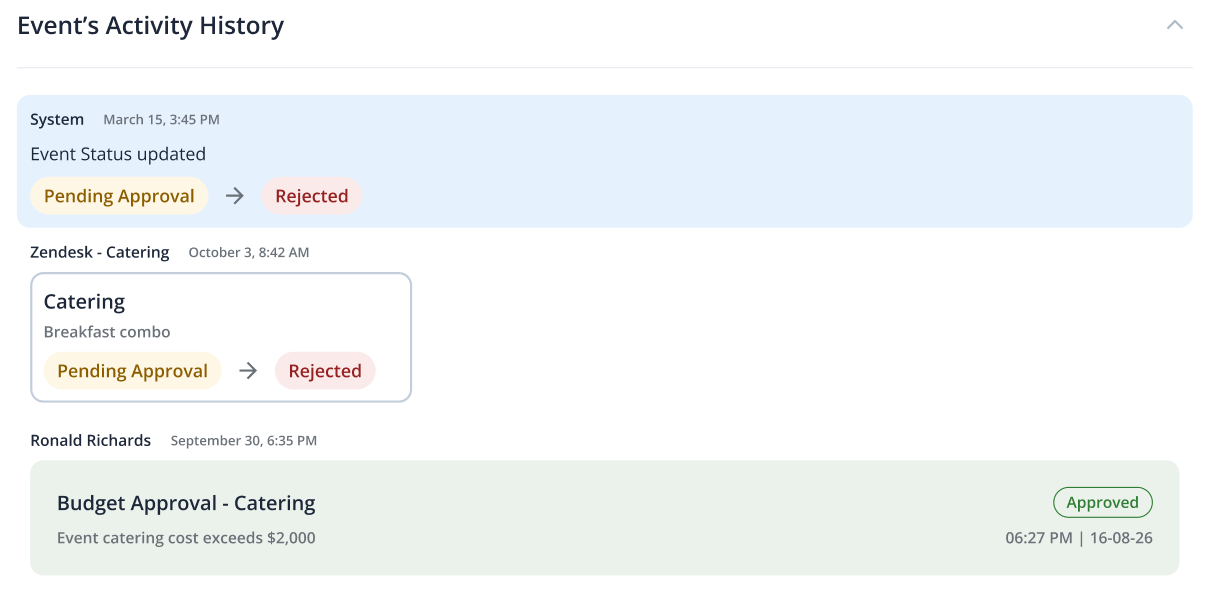
A complete record, ready when you need it.
After the event, a full summary is ready automatically. Who requested what, what was approved, what changed along the way, and what happened on the day itself. No spreadsheet to fill in, no chasing people for notes.
- Event history is captured automatically across the full lifecycle
- Available to event hosts and administrators without pulling exports
- Useful for internal reviews, compliance checks, and planning future events
More from CXAI Events
Three capabilities that work in the background of every event you run.
Edits don't restart everything.
When details change, CXAI Events updates the relevant teams and re-routes only what needs re-approval. No new submission. No lost context. Changes are logged, traceable, and visible to everyone involved.
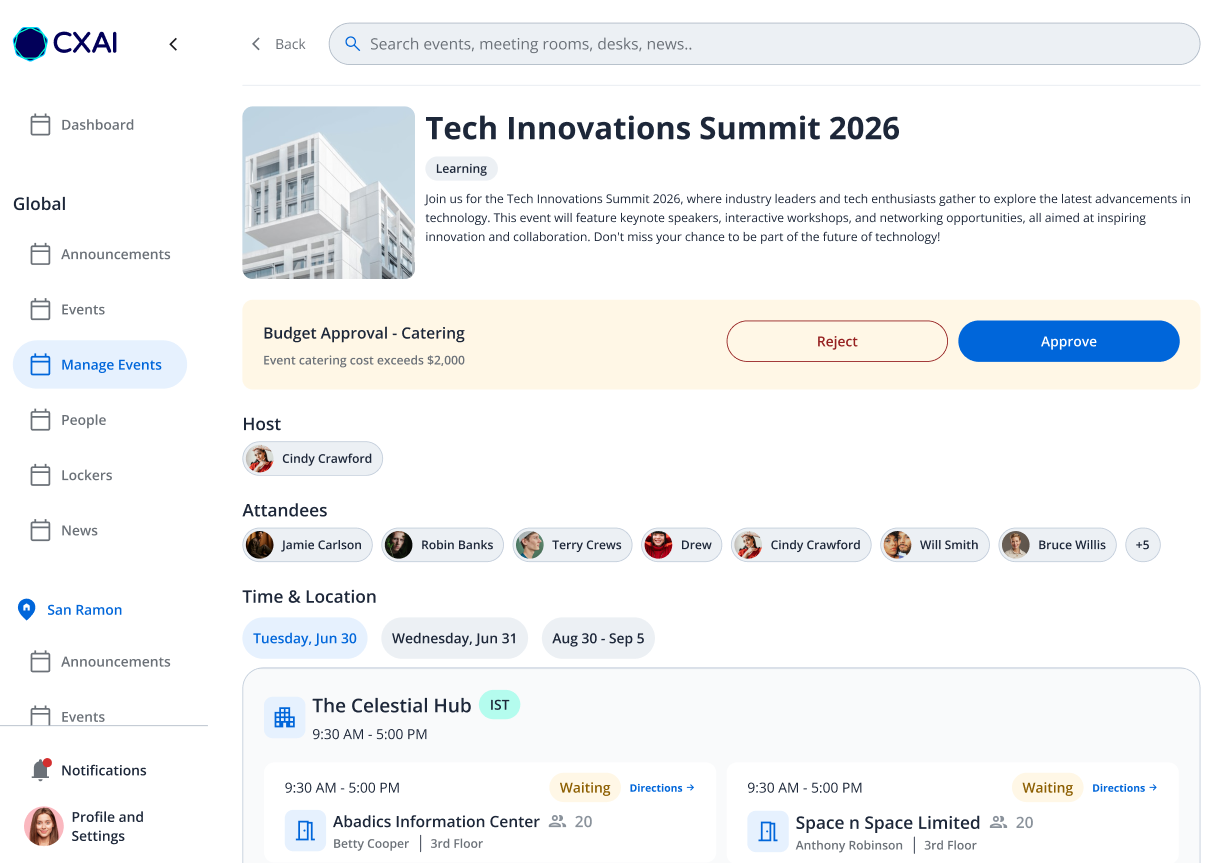
Calendar and room booking, connected.
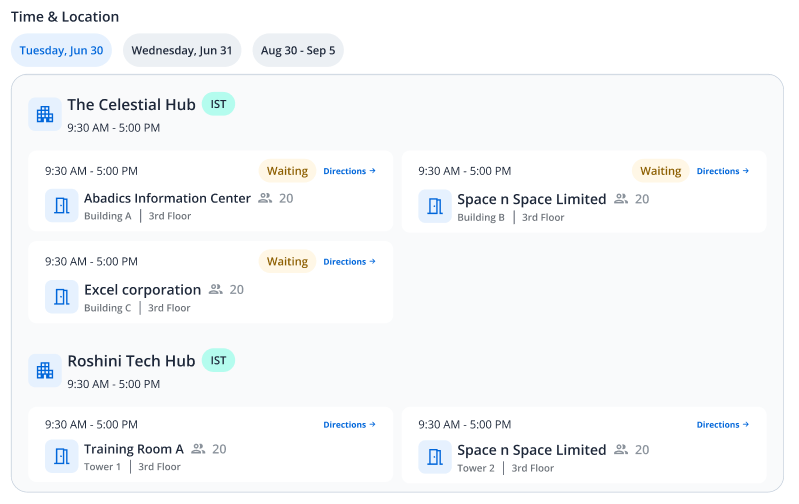
Room availability, booking confirmations, and calendar holds are handled as part of the event request. Hosts see availability in real time and the calendar record is created automatically.
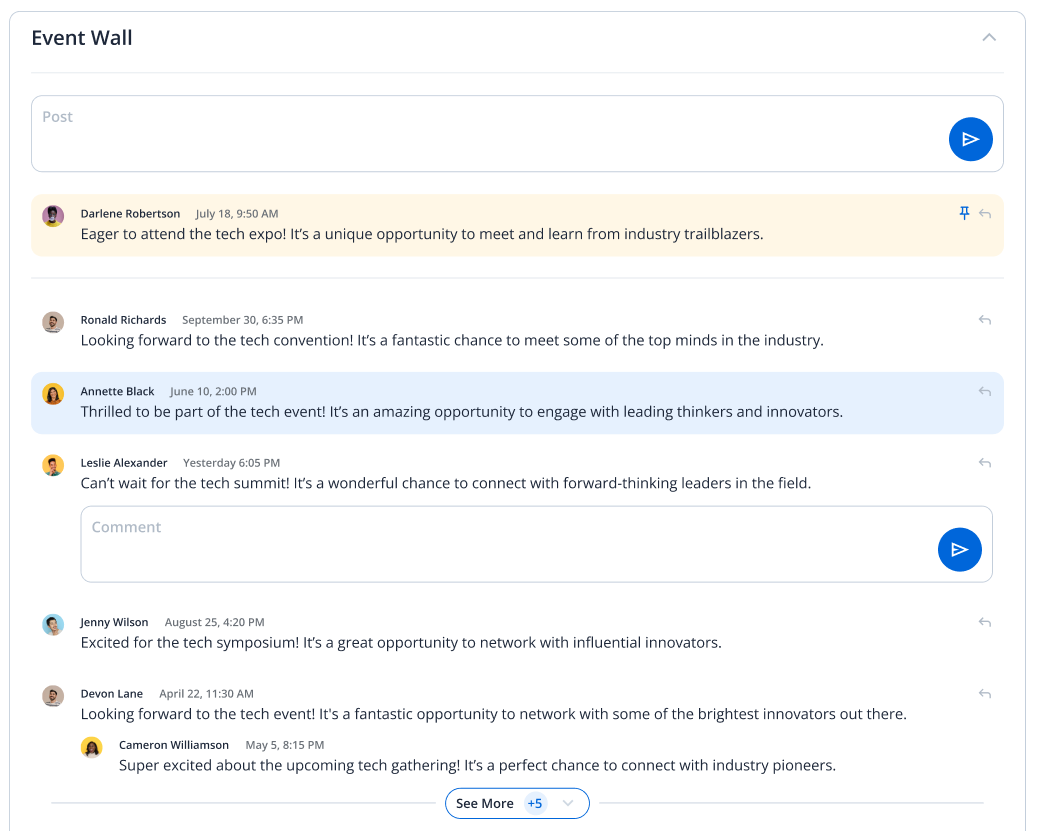
Employees find events on their own.
The event wall gives employees a single place to browse and register for upcoming internal events. Town halls, training sessions, company all-hands.
Built for everyone who makes internal events happen.
Workplace Experience Leaders

You absorb the chaos. Room approvals, catering coordination, AV setup, and attendee registration are all handled by hand, all in parallel, on top of everything else you're managing. CXAI Events takes the coordination off your plate so your team can focus on the experience itself.
What you're dealing with today- Requests come in through one structured intake instead of 10 different people emailing, Slacking, and calling about the same event.
- Catering, AV, and security confirmations are visible in one place. You see exactly what's confirmed and what's pending without chasing each team separately.
- When an event detail changes, every affected party is notified through the platform. You're not the one manually restarting the loop.
- Your team's capacity goes toward running events well, not tracking down confirmations and bridging the gaps between systems that don't talk to each other.
Executive Assistants & Chiefs of Staff

You organize the events that matter most: board meetings, board weeks, CABs, training programs, and town halls. The planning tools available to you were never built for this level of complexity. CXAI Events was.
What you're dealing with today- One structured request covers the full event. Every service is captured at intake and visible to every team involved, with no repeat conversations.
- Requests come in through one structured intake instead of 10 different people emailing, Slacking, and calling about the same event.
- Live status on every detail means you know exactly what's confirmed before the day of, without chasing six people the night before.
- The same intake process works for a 10-person CAB and a 200-person town hall. Complexity scales, your process doesn't have to.
Corporate Real Estate &
Facility Leaders

You think in cost per square foot and space utilization rates. Every approval you process for an event was likely requested, tracked, and followed up on manually by someone else, which means your team is spending time on coordination overhead that should be automated. CXAI Events gives you utilization data and ROI visibility, not just bookings.
What you're dealing with today- All space approval requests come through one structured channel. Your team responds in CXAI Events instead of across a scattered email inbox.
- Space utilization is tracked automatically across every event: by room, by team, by quarter. The data exists without anyone having to pull it.
- Event-level reporting gives you the data you need to make real estate decisions and justify your space portfolio to the business.
- Your team spends less time processing ad hoc requests and more time on the strategic space planning work that actually matters.
Works with the tools you already have.
CXAI Events connects to your existing systems. It doesn't replace them. Your IT team keeps control. Your event teams stop switching between platforms to get one event coordinated.

Microsoft 365 / Exchange
Calendar sync, room booking, and notifications through the tools your teams already work in every day.

ServiceNow & Ticketing
Facilities and IT requests flow through your existing ticketing system. No duplicate entry, no parallel processes.

Catering & Food Services
Catering requests and confirmations connect directly to your food service platforms and preferred vendors.

AV & Technology
AV setup requests are captured at intake and routed to your AV team automatically, confirmed before the day of.
Enterprise-ready. IT-approved.
CXAI Events is built for enterprise environments. Your IT and security teams won't need to start from scratch or make exceptions to accommodate it.

Single Sign-On (SSO)
Integrates with your existing identity provider. No new credentials to manage, no additional password surface to secure.

Role-based access controls
Define who can submit requests, who approves, and who has admin visibility. Structured around how your org actually works.

Fits your existing stack
CXAI Events connects to the tools you already run: Microsoft 365, ServiceNow, your building management and other systems. Nothing gets ripped out.

Built for enterprise scale
Whether you manage one campus or a global portfolio, CXAI Events handles the volume and complexity of enterprise event operations.

Full audit trail
Every request, approval, and change is logged. Compliance and security teams have a complete record of every event and who approved what.

Enterprise-grade data security
CXAI operates on infrastructure with the encryption, access logging, and security controls your IT team expects before signing off.